Now Fully Available in English
Many companies are working more internationally, and business software should support this. Our apps have been available in English for a while, and now the web application follows suit. Keeping is now fully available in both Dutch and English. Each colleague can set their preferred language to either Dutch or English.
We received many emails requesting an English version of the web application, so that your English-speaking colleagues can also use Keeping. Now, that’s fully possible!
To change your language to English, go to My Account in the dropdown menu in the top right. Under Change Language, you can easily switch the language.
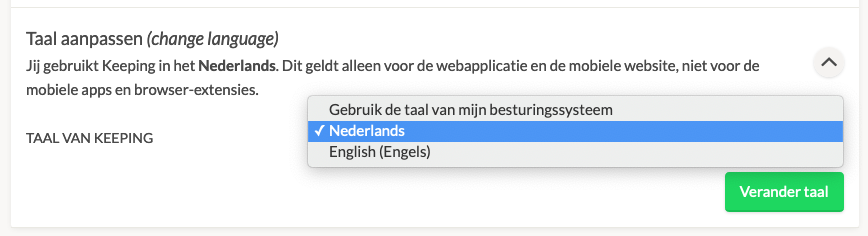
The browser extensions and mobile apps have supported English for some time, automatically adopting the system language. This new setting is specifically for the web application and mobile website, not the browser extensions or mobile apps, which will continue to follow the system language. Want the web application to do the same? Then select "Use my operating system’s language."
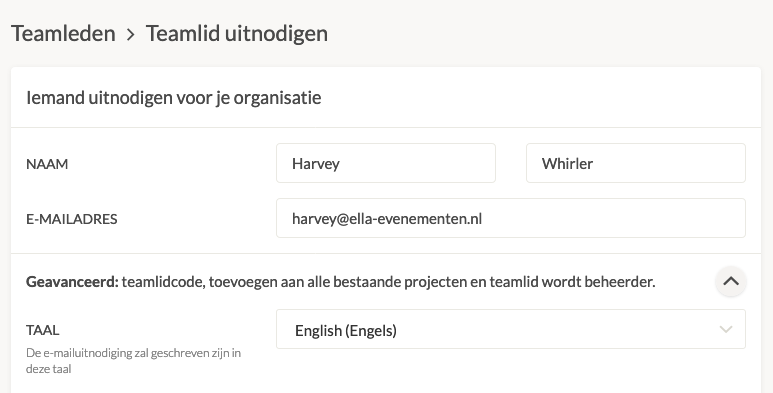
You can also send invitations in both languages. So, if you’d like to add a new colleague to your Keeping environment, but they don’t speak Dutch, go to Invite Team Member and expand Advanced to change the invitation language.
Read more about changing the language in the web application. For now, the support articles and website are only available in Dutch. Prefer another language? Use Google Translate from your browser.

