Effortless time tracking for Asana tasks
Time tracking in Asana turns all your Asana tasks into detailed work entries. Splitting work into tasks is useful, and you can get even more out of it by tracking how much time you spend on each task.

To connect with an external project management program, you need at least Keeping Plus. Additionally, a separate Asana account is required. Any necessary Asana subscription is not included.
Time tracking in Asana with Keeping
Asana is a project management tool for organizing tasks and related information. It streamlines the workflow for every project manager, reducing email communication (by up to 90%) and increasing the use of task lists in Asana. To reinforce this change, it’s helpful to know how many hours are spent on individual tasks, enabling accurate tracking of time allocation within a project. Now, with the time-tracking integration for Asana, you can do just that.
How does it work?
We’ve developed two browser extensions for Keeping, namely the Chrome extension and the Firefox add-on. Through these browser extensions, Keeping can connect with external websites like Asana. We do this by making a Keeping button available directly in the Asana interface itself. So, in the detail view of each task, you’ll see the Keeping button that lets you track time.
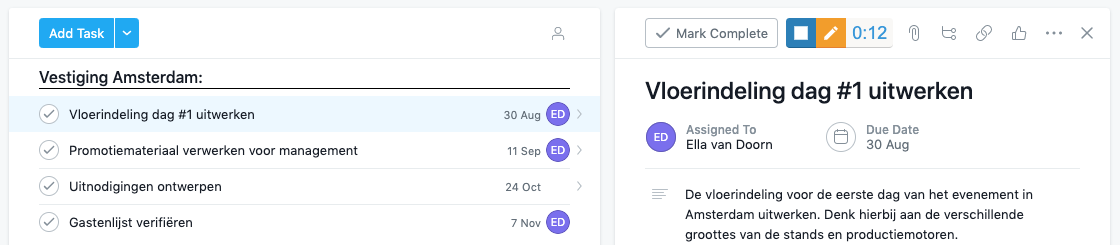
This is what the Keeping button looks like in the detail view of an Asana task.
Linked time entries with Asana tasks
The time-tracking integration with Asana ensures that each task with tracked time automatically appears in your Keeping reports. This allows you to see within a project which time entries belong to which Asana tasks, gaining insights into the progress of work. You can also see how many hours have been tracked for each task directly in an Asana task list. Learn more about how this works.
Want to track time for your Asana tasks?
Start tracking time within Asana today. Sign up for Keeping and enjoy a free 14-day trial of the Plus subscription.

