Agile time tracking in your Jira environment
Jira is project management software for a (software) development team. In Jira, you discuss, assess, and monitor the progress of the (software) development process. Thanks to the extensive interface and many available features, you can set up Jira exactly how you want it to work for your team.

To connect with an external project management program, you need at least Keeping Plus. Additionally, a separate Jira account is required. Any necessary Jira subscription is not included.
Time tracking in Jira with Keeping
Time tracking in Jira helps make your software development process even more agile. Most development teams today work with an updated agile methodology, meaning that you limit your software development planning to about a month (sometimes even shorter). During this time, progress is continuously evaluated and monitored. At these moments, it’s useful to see how all time allocation is progressing. By tracking time, the combination of Jira and Keeping allows you to perfectly monitor the progress of sprints and the efforts surrounding development. This is why we’re integrating our time tracking with Jira.
How does it work?
Keeping has two browser extensions: the Google Chrome extension and the Firefox add-on. Through these browser extensions, we connect with Jira by making a Keeping button available directly in the Jira interface. This way, you’ll see the Keeping button next to each item in the Jira item list to start a time entry. You’ll also see the same Keeping button on the item’s detail screen for easy access.
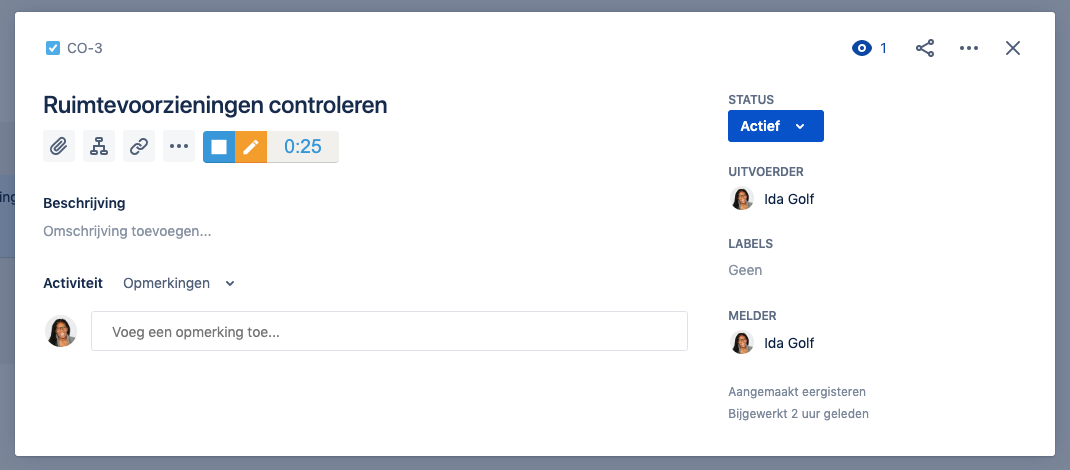
This is what the Keeping button looks like in the detail view of a Jira item.
Linked Jira items appear directly in your reports
Once you’ve tracked time on items in Jira, they automatically appear with the associated time entries. This lets you see exactly how much time you’ve spent on each item in Jira. You can also see directly in Jira how many hours have been tracked on which items, which is very convenient. Learn more about how this works.
Want to link Jira with Keeping for convenient time tracking?
Start tracking time in Jira today. Try Keeping Plus for free for the first 14 days.

