How do I cancel my subscription?
Find more information about our pricing model here.
Note: Ensure you are logged in as the organisation owner, as this is the only user in the organisation who can change subscription settings.
Cancelling a Subscription
In the main menu, navigate to Settings → Billing, and there you will see the option to cancel your subscription.
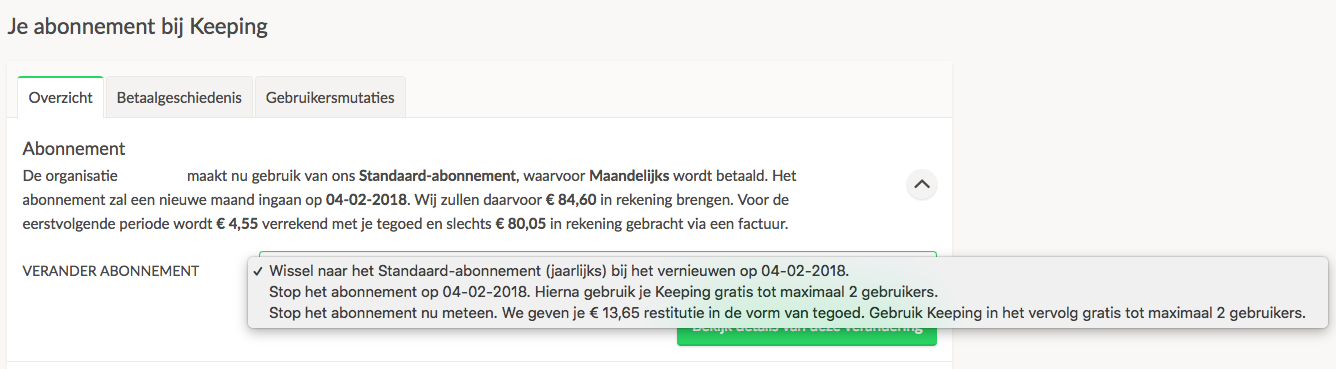
Cancelling Your Organisation's Subscription
When you've decided to cancel your subscription, you can do this via the subscription menu in Keeping.
- You can choose to end your subscription immediately.
- You can choose to end your subscription at the end of the current term.
If you’ve overpaid, the excess amount will be converted to a credit linked to your organisation, which can be used for future Keeping payments.
Limitations After Cancellation
After cancelling a subscription, you can continue using the free version of Keeping. However, you will no longer have access to the additional features provided by the paid subscription, and only one user can remain active in your Keeping environment. Any additional active users will be automatically archived 14 days after cancellation or subscription expiration.
Your Keeping Credit
Any credits accumulated will be automatically applied toward new charges, such as if you decide to subscribe again in the future. Credits are not paid out.

