View budget report
To use budgets in Keeping, you need at least Keeping Pro.
If you have set a project budget in Keeping, it will appear in the Budget Report. You can navigate to the Budget Report via Overviews > Budget Report. Here, based on the set budgets and your logged hours, a projection of the expected revenue is displayed. For the calculation of the estimated revenue, your set rates are used, unless a budget per project has been specified.
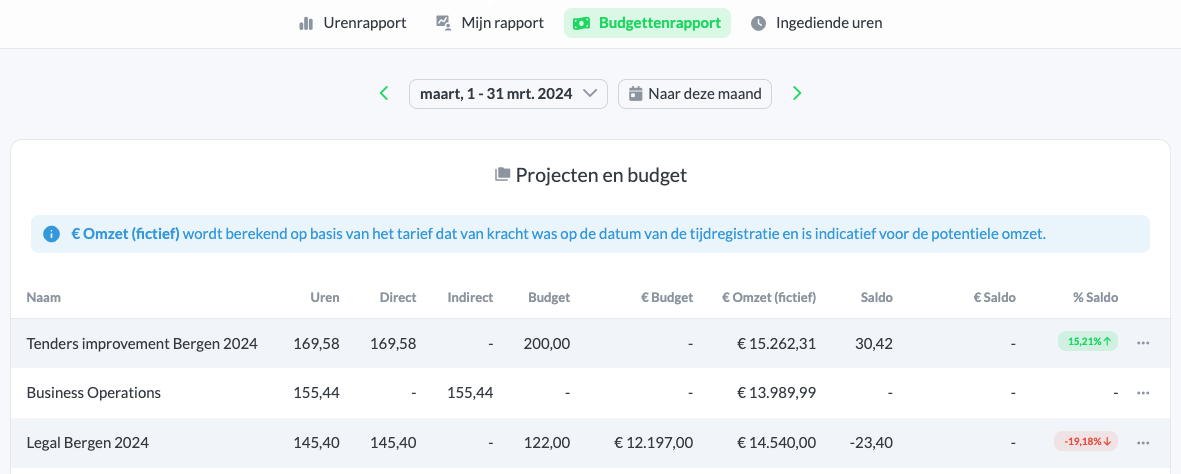
The following columns are displayed:
- Name: Project name
- Hours: Hours logged in Keeping under this project (for the selected period)
- Direct: Number of hours that are direct
- Indirect: Number of hours that are indirect
- Budget: Hour budget as set in the project budget
- € Budget: Currency budget as set in the project budget
- € Revenue Estimate: Revenue calculated based on the logged hours and the rate. If a separate project budget in hours or currency is set, that budget will be used; otherwise, the rate is used.
- Balance: The difference between the logged hours and budgeted hours
- € Balance: The difference between the logged hours and the budget in currency
- % Balance: The percentage difference between the logged hours and the budget

